CDI Query vs CDI Alert: What's the Real Difference?
Learn the real difference between a CDI alert and a CDI query, where provider education fits, and what to expect from AI-driven CDI tools.
Published on:
September 22, 2026


CombineHealth identifies CDI alerts during medical coding, explains how the clinical documentation gap affects the coding decision, and either tracks the issue for provider education or escalates it into a CDI query when physician clarification is needed.
Key Takeaways
• A CDI alert flags a possible documentation problem in the current chart, but it doesn't automatically require the provider to take action.
• A CDI query is a formal request that requires the provider to clarify or add documentation before the chart can be coded accurately.
• Not every CDI alert should become a query. Treating every alert as a query risks provider fatigue, while ignoring real gaps risks denials and audit exposure.
• Provider education targets recurring documentation patterns across a physician's charts, so the same gap stops triggering new alerts month after month.
• AI can speed up the alert-to-query decision, but only when explainability and audit trails are built in from the start.
• CombineHealth is a leading self-learning, autonomous medical coding software with CDI embedded in it. The software reviews the full encounter, identifies documentation gaps that affect coding specificity, medical necessity, or reimbursement, and explains why each gap matters. Depending on the organization's workflow, CDI findings can be tracked for provider education or used to suspend the chart and request physician clarification, while uncertain cases are routed to review.
Up to 86% of claim denials are potentially avoidable, according to HFMA, and the root cause often comes down to the same gap between what a clinician documented and what the payer needed to see.
Closing that gap starts with having a solid Clinical Documentation Improvement (CDI) program in place, one that gets the fundamentals right, including a distinction that's easy to blur. "CDI alert" and "CDI query" are often used interchangeably, but they trigger two very different responses.
In this article, we'll break down the difference between a CDI query and a CDI alert, where provider education fits, and what your compliance team should expect from any system, human or AI, that's making these calls on your organization's behalf.
What Is a Clinical Documentation Improvement Alert?
A Clinical Documentation Improvement (CDI) alert flags a potential issue in clinical documentation that could affect coding accuracy, specificity, medical necessity, or reimbursement.
For example, a physician documents "acute kidney injury" in a patient's chart, but the note doesn't specify the stage or link it to an underlying cause such as dehydration or sepsis. A CDI alert would flag this documentation gap, since the missing specificity could affect both the accuracy of the assigned code and the DRG (diagnosis-related group) used for reimbursement.
CDI alert alone does not automatically resolve the issue or require the provider to take action. It identifies a risk or opportunity for a CDI specialist or medical coder to review and decide whether further action is needed.
Recommended Reading: A Complete Guide to Clinical Documentation Improvement
What Is a Clinical Documentation Improvement Query?
A CDI query is a formal request asking a provider to clarify clinical documentation when the existing record does not clearly support a diagnosis, procedure, or level of service.
A CDI query is not a separate, unrelated step from a CDI alert—it's what an alert becomes once someone acts on it. When a CDI specialist or coder reviews an alert and decides the documentation gap can't be resolved without the provider's input, that alert escalates into a formal query sent to the provider.
Unlike a CDI alert, a CDI query requires a provider response because the documentation may not be complete enough to support accurate coding without clarification.
CDI queries also carry greater compliance risk than alerts because they directly ask a provider to clarify the record. A poorly worded query can lead the provider toward a specific answer instead of asking for an objective clarification.
For example, asking "Given the elevated creatinine, do you agree this is acute kidney injury?" tells the provider what to write. A better version lists the lab values and asks the provider to choose from several possible diagnoses.
Does Every CDI Alert Need to Become a Query?
No. Treating every CDI alert as an automatic query can create its own compliance risk.
There are two possible CDI workflows in a healthcare organization:
- The CDI issue is tracked, but the claim continues to billing. The organization can later use those findings as feedback for physicians.
- The chart is suspended, sent back to the physician, and the physician is asked to provide the missing documentation before the claim proceeds.
If you query everything, it could lead to physician query fatigue, where providers receive so many requests that they may start responding just to clear their inbox. Query too little, and unsupported diagnoses or downcoded encounters can reach billing without the clarification needed for accurate coding.
Recommended Read: 10 CDI Best Practices for Healthcare Organizations
Why Provider Education Matters in Clinical Documentation Improvement
Provider education in CDI closes the loop between fixing individual charts and improving documentation over time. Without it, the same documentation gaps can continue to trigger alerts and queries month after month.
A single CDI query addresses one chart. Provider education addresses the behavior behind the gap by showing physicians recurring patterns across their own encounters instead of treating each issue as an isolated flag.
This distinction also changes how CDI teams measure performance. Counting CDI queries sent and queries answered measures activity, not improvement. Tracking recurring alert patterns by provider, specialty, or documentation type helps CDI teams identify where targeted education is needed and determine whether those patterns decrease over time.
CDI Alert vs. CDI Query vs. Provider Education
CDI alerts, queries, and provider education address three related but distinct problems. A CDI alert identifies a documentation issue, a CDI query asks the provider to clarify the current record, and provider education addresses recurring documentation patterns.
The Complete Clinical Documentation Improvement Workflow at a Glance
The process starts with clinical documentation, identifies potential gaps, resolves issues that require provider clarification, and uses recurring patterns to improve documentation going forward.
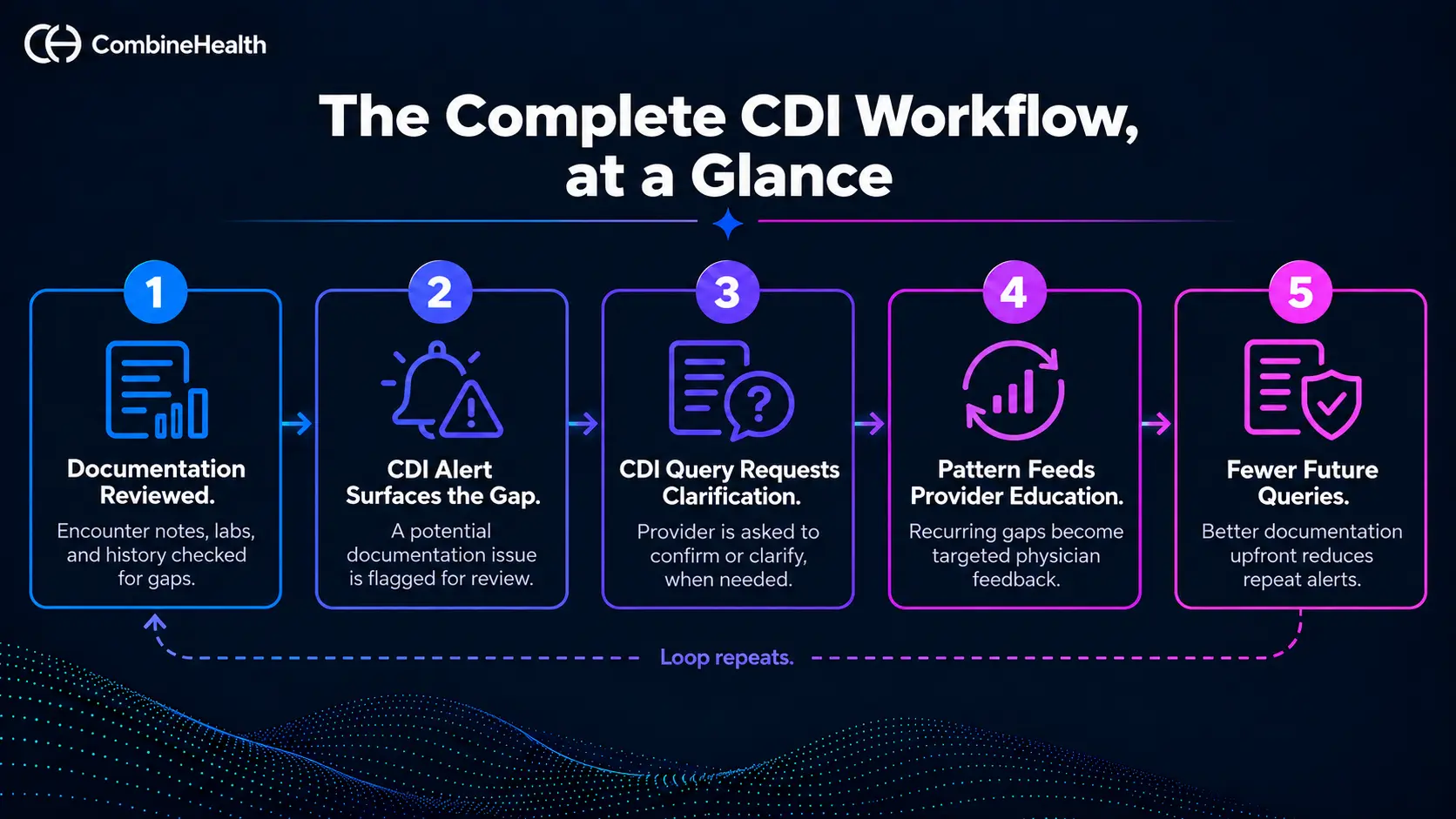
Every stage in the CDI workflow depends on the one before it working correctly, and a breakdown at any point weakens everything downstream.
- If CDI alerts are not reviewed consistently, queries can be sent for the wrong reasons, while genuine documentation gaps can be missed.
- If CDI queries are not resolved and logged properly, there is no reliable pattern data to guide provider education.
- If provider education is not tied to a physician's recurring alerts, the physician may receive generic guidance instead of education focused on the specific gaps appearing in their charts.
This is why explainability and audit trails matter throughout the CDI workflow, not only when a query is created. The goal is to keep the loop closing on itself so recurring documentation gaps decrease and alert and query volume declines over time.
Where Do Explainability and AI Audit Trails Fit Into the CDI Workflow?
Explainability and audit trails make AI-generated CDI alerts and queries verifiable and traceable. When AI Clinical Documentation Improvement Software flags a documentation gap or recommends a query, CDI specialists need to understand why before acting on it.
Explainability Helps Validate the Recommendation
Before approving an AI-generated alert or query, a CDI specialist should be able to see:
- What clinical indicators triggered it
- Where the supporting evidence appears in the medical record
- What documentation is missing, conflicting, or insufficient
- Why provider clarification may be necessary
This allows the CDI specialist to validate the recommendation instead of relying on a black-box output.
Audit Trails Preserve What Happened in the Encounter
An AI audit trail creates a record of the CDI decision and its resolution. It should make it possible to reconstruct:
- Why the documentation issue was flagged
- What evidence supported the query
- How the recommendation was reviewed
- How the provider responded, and the issue was resolved
This traceability matters for internal review, compliance, and audits. AI does not eliminate the need to support a coding or CDI decision with clinical documentation; it makes maintaining a clear record of that decision even more important.
Recommended Read: Explainability in AI for Healthcare RCM
How CombineHealth Handles CDI Alerts and Queries
CombineHealth builds the alert-versus-query decision into its medical coding platform, so the distinction between flagging an issue and asking the provider for clarification does not depend on inconsistent judgment across the CDI team.
How CombineHealth Handles CDI Alerts
A CDI alert in CombineHealth is a documentation issue the platform identifies while reviewing an encounter. The medical coding platform reviews the full clinical record rather than a single note in isolation and surfaces gaps that could affect coding, medical necessity, or reimbursement. These can include missing support for a higher evaluation and management (E/M) coding level or incomplete documentation for a diagnosis.
Not every alert needs to go to the provider. Some organizations can track the issue, allow the claim to proceed, and use recurring patterns for provider education.
How CombineHealth Handles CDI Queries
A CDI query in CombineHealth is used when the documentation gap requires provider clarification before the claim can proceed accurately. CombineHealth can suspend the chart and return it to the physician with the specific documentation gap identified. After the physician responds, the platform re-evaluates the chart, and the claim can move forward with the clarified documentation.
For example, if an E/M encounter is being downcoded because the physician did not document an independent interpretation, CombineHealth can identify why the encounter does not support the higher E/M level and show what documentation is missing.
The issue can then be tracked for provider education or escalated into a query, depending on the organization's workflow.
CombineHealth's 7-Step CDI Process
- Review the full encounter across available clinical documentation rather than relying on a single note.
- Generate the coding decision using payer rules, coverage policies, and client-specific guidelines.
- Check the documentation to determine whether it supports the coding decision.
- Determine the next action by tracking the issue for provider education or escalating it to a query when clarification is needed.
- Explain the issue with the clinical evidence and documentation gap needed for CDI or provider review.
- Route uncertain cases to human review instead of automatically finalizing them.
- Feed recurring documentation gaps into provider education to reduce repeat issues.
Each step produces an explanation and audit trail, allowing the compliance team to reconstruct what triggered an AI-generated alert or query, what evidence supported it, how it was reviewed, and how it was resolved.
Case Study: CombineHealth Caught 5× More Documentation Gaps Than Traditional Coding
In a 1,000-chart emergency department case study, CombineHealth's platform identified 5× more CDI-triggering documentation gaps, coded roughly 85% of charts autonomously, and automatically escalated the rest whenever documentation was ambiguous or conflicting.
Get the Alert-to-Query Call Right, Every Time
Getting the alert-versus-query distinction right isn't a nice-to-have. It's what keeps documentation gaps from turning into denials, keeps physicians from drowning in unnecessary queries, and keeps your compliance team able to defend every decision when an auditor asks about it.
AI can make that distinction faster and more consistently than manual review alone, but only if explainability and audit trails are built in from the start, not bolted on afterward.
An AI medical coding software that can't show why it flagged a chart, or reconstruct how a query got resolved, isn't ready to make that call on your organization's behalf.
CombineHealth is an autonomous, self-learning medical coding platform that handles the alert-to-query decision with explainability and audit trails built into every step.
Book a demo to see it work on your own charts!
FAQ
Is a CDI alert the same thing as a CDI query?
No. A CDI alert identifies a potential documentation issue for internal review. A CDI query is a formal request asking the provider to clarify or add documentation, and it requires a response.
Does every CDI alert require a physician query?
No. Some alerts can be tracked and addressed later through provider education without holding up the claim. Others require provider clarification before the chart can be coded accurately.
What makes a CDI query compliant?
A compliant query presents the clinical facts already documented in the record and allows the provider to determine the appropriate answer. It should not lead the provider toward the answer the CDI specialist or coder expects.
How is explainability different from an audit trail in CDI?
Explainability shows the clinical evidence behind a specific alert or query so a CDI specialist can evaluate the recommendation. An audit trail records how the alert or query was reviewed and resolved, allowing the organization to reconstruct the decision later.